We have compiled a list of manufacturers, distributors, product information, reference prices, and rankings for CAM software.
ipros is IPROS GMS IPROS One of the largest technical database sites in Japan that collects information on.

CAM software Product List and Ranking from 22 Manufacturers, Suppliers and Companies

Last Updated: Aggregation Period:Dec 03, 2025~Dec 30, 2025
This ranking is based on the number of page views on our site.

CAM software Manufacturer, Suppliers and Company Rankings

Last Updated: Aggregation Period:Dec 03, 2025~Dec 30, 2025
This ranking is based on the number of page views on our site.

  1. システムクリエイト Osaka//Industrial Machinery
  2. null/null
  3. ゴードーソリューション Shizuoka//software
  4. 4 ソリッドキャムジャパン Tokyo//software
  5. 5 エリジオン Shizuoka//software

CAM software Product ranking

Last Updated: Aggregation Period:Dec 03, 2025~Dec 30, 2025
This ranking is based on the number of page views on our site.

  1. Malsugo: Pursuing surface quality by accurately applying 3D finishing passes with boundary functions. システムクリエイト
  2. Information and Campaigns for CLUB.JBM
  3. NAZCA5 CAM Mill for 2D CAM Machining ゴードーソリューション
  4. 4 CAM software "SolidCAM" comprehensive catalog ソリッドキャムジャパン
  5. 5 Easy, low-cost, high-performance "Camest Machining 2D CAM" エリジオン

CAM software Product List

1~15 item / All 60 items

Displayed results

NAZCA5 CAM Mill for 2D CAM Machining

2D and 2.5D machining/milling CAM software that can create hole processing, flat processing, and complex three-dimensional shapes, along with various features to increase work speed.

You can use all the features of hole processing, 2D, 2.5D, projection calculation, and processing instruction sheets. ■ CAM Hole Processing Function - Great for processing with many holes and types! The more you use it, the more convenient it becomes! - Hole information can be registered from CSV or existing patterns even without drawings! ■ CAM 2D Function - Enhance efficiency in 2D processing with a variety of operations! - Pocket processing, contour processing, text processing, chamfering, etc. - A rich variety of processing patterns are available! ■ CAM 2.5D Function - Easily create three-dimensional shapes based on 2D drawings! - Contour processing, kamaboko processing, rotational body processing, etc. - Convenient features such as adding R/C without needing to draw in CAD! ■ CAM Projection Calculation Function - Transform shapes created with the 2.5D function to create complex shapes! - Projection escape, rotational transformation, cross-section projection, rotational surface projection, etc. ■ Processing Instruction Sheet - Output processing conditions, processing trajectories, etc., created with CAM in Excel format. * NAZCA5 CAM Mill is the successor product to Nazca Pro 2D/2.5D/hole processing. <Trial> We offer a trial version that allows you to test all the features of the full product as many times as you like within the usage period! Please feel free to contact us.

  • 2D CAM

Added to bookmarks

Bookmarks list

Bookmark has been removed

Bookmarks list

You can't add any more bookmarks

By registering as a member, you can increase the number of bookmarks you can save and organize them with labels.

Free membership registration

Nazca Product Lineup Catalog

All products of the NAZCA5 series, Nasca Pro series, and Nazca Neo series are listed!

You can download a catalog that compiles the product lineup of Gordo Solutions from Ipros. It features many tools that enable a smarter work environment and effective management! The catalog clearly shows software that matches your processing machines, so please take a look.

  • Other operation management software

Added to bookmarks

Bookmarks list

Bookmark has been removed

Bookmarks list

You can't add any more bookmarks

By registering as a member, you can increase the number of bookmarks you can save and organize them with labels.

Free membership registration

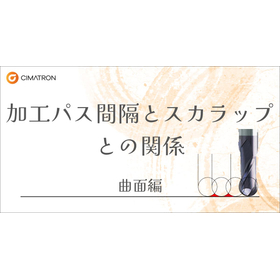
Relationship between Processing Path Interval and Scallop: Curved Surface Edition

For those who are confused about setting the pitch between passes in CAM! An explanation of CAM settings and the size of the scallop.

In the manufacturing of plastic molds, press molds, forging molds, and casting molds, we will introduce the relationship between the surface roughness of the machining when using 3D CAM and the pitch of the machining path. We hope this will be somewhat helpful. The content we are about to explain is aimed at those who fall into the following categories. Please take a look. 【Recommended for】 ■ Those who want to confirm the relationship between the size of the tool radius and the scallop ■ Those who are unsure about setting the pitch between paths in CAM *You can view the detailed content of the article through the related links. For more information, please download the PDF or feel free to contact us.

  • 2D CAM
  • 3D CAM
  • Other CAM related software

Added to bookmarks

Bookmarks list

Bookmark has been removed

Bookmarks list

You can't add any more bookmarks

By registering as a member, you can increase the number of bookmarks you can save and organize them with labels.

Free membership registration

Incredible machining speed! Dramatic tool longevity! iMachining!

Plugin for CADSUPERWorks! Incredible machining speed and dramatic tool longevity with SolidCAM's iMachining!

CADSUPERWorks is the result of combining the globally proven SOLIDWORKS with the user-friendly and well-regarded "CADSUPER," creating CADSUPERWorks. Additionally, it is now possible to plug in the new CAM software feature 'iMachining,' allowing us to provide not only design but also innovative machining technologies. iMachining features a unique machining path called "Morphing Spiral" developed by SolidCAM, which enables astonishingly high-speed machining and significantly extends tool life by controlling cutting loads. Tests conducted showed that machining time was reduced to one-fiftieth compared to conventional methods, with minimal tool wear or damage compared to traditional machining paths. This is particularly effective for difficult-to-machine materials such as stainless steel (SUS) and hardened materials (SKD, SKS), as well as for workpieces with high cutting volumes.

Added to bookmarks

Bookmarks list

Bookmark has been removed

Bookmarks list

You can't add any more bookmarks

By registering as a member, you can increase the number of bookmarks you can save and organize them with labels.

Free membership registration

The definitive edition of CAM software! hyper MILL

Quickly and easily create 5-axis NC programs.

With quick processing and high-quality finish, you can easily and swiftly create 5-axis NC programs. 【Features】 Tool paths with fully automated interference checks and avoidance. Supports high-speed simultaneous 5-axis machining for pocket shapes with curvature on the bottom. Generates tool paths that effectively utilize barrel tools, contributing to cost reduction. Utilizes existing tool paths to output new 5-axis tool paths that have undergone interference checks using different tool protrusion lengths and other tools. For more information and details, please feel free to download the catalog or contact us with any questions. Marble Co., Ltd. Embedded Products Division, Product Business Department Phone: (03) 3419-6011

Added to bookmarks

Bookmarks list

Bookmark has been removed

Bookmarks list

You can't add any more bookmarks

By registering as a member, you can increase the number of bookmarks you can save and organize them with labels.

Free membership registration

[Processing Demonstration 4] The Revolution of CNC Machining: iMachining!

Incredible machining speed and dramatic tool longevity with iMachining! Amazing machining demonstration of NAK55, considered a 'difficult-to-machine material'.

iMachining is characterized by a unique machining path called "Morphing Spiral" developed by SolidCAM, which enables astonishingly high-speed machining and significantly extends tool life by controlling cutting loads. Please confirm how easily NAK55, which is generally considered a "difficult-to-cut material" (heat-treated with surface assurance), can be machined. For more details, please feel free to contact us. Marble Co., Ltd. Embedded Products Division, Product Business Department Phone: (03) 3419-6011

Added to bookmarks

Bookmarks list

Bookmark has been removed

Bookmarks list

You can't add any more bookmarks

By registering as a member, you can increase the number of bookmarks you can save and organize them with labels.

Free membership registration

Mastercam 3D-CAD + Woodworking Processing 'Router'

This is a CAM module that supports the unique CAM of woodworking machines, in addition to Mastercam's 3D CAD functions.

This is a CAM software that supports unique features for woodworking machines in addition to Mastercam's 3D-CAD capabilities. In addition to standard cutting tool paths, it is also capable of creating complex tool paths for operations such as block drilling and circular saw cutting. Furthermore, by using a composite head, it can accommodate 5-axis machining as well.

Added to bookmarks

Bookmarks list

Bookmark has been removed

Bookmarks list

You can't add any more bookmarks

By registering as a member, you can increase the number of bookmarks you can save and organize them with labels.

Free membership registration

3D CAM software 'NCG CAM'

Standalone 3D CAM software that can easily process complex parts.

"NCG CAM" is a user-friendly 3D CAM software designed from the perspective of the user, allowing for easy operation by the operator. With simple operations, you can create NC data immediately after just one day of training. Additionally, it is well-known for its surface finishing quality, and by increasing machining tolerance and fully utilizing computational capabilities, even more beautiful finishes can be expected. 【Features】 ■ High-speed machining and computation ■ Easy operation ■ Beautiful finishes *For more details, please download the PDF or feel free to contact us.

Added to bookmarks

Bookmarks list

Bookmark has been removed

Bookmarks list

You can't add any more bookmarks

By registering as a member, you can increase the number of bookmarks you can save and organize them with labels.

Free membership registration

CAM software "Zig Vision for JAVA"

Specialized data editing CAM software tailored for jigs.

"Zig Vision for JAVA" is CAM software equipped with features such as pad flash conversion, optimization of probe pins, address numbering of net endpoints (area connect), and sorting and ordering of round flashes on a single map line (auto map). It enables the high-speed placement of 4-terminal points based on configuration settings and generates inspection data for terminal points. 【Features】 ■ Supports large data processing (64-bit) ■ High-speed extraction of inspection points ■ Fully compatible with contour data ■ Diversity of pin placement commands ■ High-speed automatic creation of 4-terminal inspection points ■ Jig NC processing support system *For more details, please download the PDF or feel free to contact us.

  • Other CAM related software

Added to bookmarks

Bookmarks list

Bookmark has been removed

Bookmarks list

You can't add any more bookmarks

By registering as a member, you can increase the number of bookmarks you can save and organize them with labels.

Free membership registration

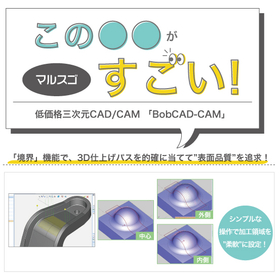
Malsugo: Pursuing surface quality by accurately applying 3D finishing passes with boundary functions.

Creating paths that pursue surface quality! This explains the "Boundary" function of "BobCAD-CAM," which offers overwhelming low prices and comprehensive features.

In finishing processes for shapes that include edges or where curvature changes sharply, unintended paths can be generated in areas not intended, which can affect the finishing quality. In such cases, the "boundary" function for partial specification of the machining area comes into play. Furthermore, the commands for "boundary projection onto surfaces" and "adjustment of tool control points" provide flexibility in this specification. By utilizing these features, you can create arbitrary paths only in the necessary areas! It is possible to apply paths appropriately and pursue the surface quality of finishing processes. The materials also explain the flow of boundary projection and the differences in machining paths due to the adjustment of tool control points, so please take a look. *You can download the materials from the button below.

  • Other CAD related software
  • Other CAM related software
  • 3D CAM

Added to bookmarks

Bookmarks list

Bookmark has been removed

Bookmarks list

You can't add any more bookmarks

By registering as a member, you can increase the number of bookmarks you can save and organize them with labels.

Free membership registration

Case study presentation of the CAM software 'iMachining'

[Video Release] Save up to 70% on processing time. Experience the overwhelming processing speed.

★30-Day Free Trial Now Available★ Register for a 30-day trial period and experience SolidCAM and iMachining for yourself!!! 'iMachining' minimizes cycle time and reduces programming time for associating roughing and finishing processes. It also extends tool life by managing chip thickness and suppressing tool chatter. 【Features】 ○ Machining of very hard high-hardness materials ○ Exceptional machining of small-diameter tools ○ 4-axis and multi-tasking lathe machining ○ Very short learning curve, etc. --------------------------------------------------- You can view the case studies by downloading them. ---------------------------------------------------    ↓   ↓   ↓

Added to bookmarks

Bookmarks list

Bookmark has been removed

Bookmarks list

You can't add any more bookmarks

By registering as a member, you can increase the number of bookmarks you can save and organize them with labels.

Free membership registration

"CAM promotional DVD" and "case studies" giveaway!

[Limited to 50 people] CAM promotion DVD and case study booklet giveaway! Processing chips are also being offered in a case.

Save up to 70% of processing time, dramatically increase tool life, and provide significant profit gains! 'iMachining' minimizes cycle time, and the association with roughing and finishing processes reduces programming time. Additionally, tools with more cutting edges allow for greater depth of cut and manage chip thickness to suppress tool chatter, thereby extending tool life. 【Info-box】 ● Promotional brochure ● iMachining chips (plastic case) ● Promotional videos (contents) - iMachining explanation PowerPoint video - iMachining machining video - SolidCAM operation video - SolidCAM demo version (SolidCAM can be operated if SolidWorks is available) - Simple operation manual *For more details, please download and take a look. If you would like a case study box, please contact us to let us know.

Added to bookmarks

Bookmarks list

Bookmark has been removed

Bookmarks list

You can't add any more bookmarks

By registering as a member, you can increase the number of bookmarks you can save and organize them with labels.

Free membership registration

CAM solution "High-speed surface machining"

High-speed surface machining of partial surfaces – An essential module for all processing sites!

SolidCAM's high-speed surface machining is a high-speed surface machining module that smoothly and powerfully processes curved surfaces in partial areas of parts, including undercuts. You can easily select the surfaces to be machined without defining the area. It supports standard and shaped tools. 【Features】 ○ Powerful surface machining with smooth and interference-free optimal tool paths ○ Complete tool control that processes only the selected areas ○ Advanced interference control for holders, arbors, and tools ○ Advanced linking ○ An essential module for all machining environments For more details, please contact us or download the catalog.

  • Other CAM related software

Added to bookmarks

Bookmarks list

Bookmark has been removed

Bookmarks list

You can't add any more bookmarks

By registering as a member, you can increase the number of bookmarks you can save and organize them with labels.

Free membership registration

CAM solution "5-axis machining for profiling"

Powerful SolidCAM indexing and multi-surface machining – the simplest coordinate system definition!

As a common understanding in today's machining environment, 4/5-axis CNC machining increases production and speeds up cycle times. SolidCAM's approach to supporting these CNC machines provides an efficient and straightforward programming method for multi-surface machining parts. SolidCAM is exceptionally strong in indexed 4/5-axis machining. 【Features】 ○ The simplest coordinate system definition for indexed 5-axis machining ○ Efficient G-code for multi-surface machining that requires no editing ○ SolidCAM's "Face, Select, and Machine" is the fastest approach to multi-surface machining programming ○ Our Machining Origin Manager tracks the necessary data for each tool direction ○ Solid Verify simulation displays the tool holder and fixtures along with the material removal for all jobs For more details, please contact us or download the catalog.

  • Other CAM related software

Added to bookmarks

Bookmarks list

Bookmark has been removed

Bookmarks list

You can't add any more bookmarks

By registering as a member, you can increase the number of bookmarks you can save and organize them with labels.

Free membership registration

CAMソフトウェア『SolidCAM2015』

SolidWorksの設計モデルと完全に連携!ほぼ全てのCNC加工技術に対応

『SolidCAM』は、SolidWorksに対応したCAMソフトウェア。 SolidWorksの設計モデルと完全に連携しているため、モデルを変更した場合、CAMのジョブも自動で更新されます。 シームレスなシングルウィンドウにより、SolidWorksと同様の操作感で使えるのも特長です。 【特長】 ■SolidWorksアセンブリモデル。治具・ツーリング・バイスを定義可能 ■ほぼ全てのCNC装置での加工タイプをアプリケーションに拡張できる ■バンドル価格で提供可能 ※詳しくはカタログダウンロード、もしくはお問い合わせください。

  • Other CAM related software

Added to bookmarks

Bookmarks list

Bookmark has been removed

Bookmarks list

You can't add any more bookmarks

By registering as a member, you can increase the number of bookmarks you can save and organize them with labels.

Free membership registration

Search Keywords Related to CAM software